










Nagios là một công cụ giám sát mã nguồn mở miễn phí mạnh mẽ được sử dụng để giám sát máy chủ, mạng và cơ sở hạ tầng Linux và Windows. Với Nagios, bạn có thể giám sát mức sử dụng CPU, mức sử dụng đĩa và một số dịch vụ bao gồm HTTP, SSH, FTP, SMTP, v.v. Nó có giao diện web đơn giản và thân thiện với người dùng giúp bạn giám sát tất cả các máy chủ từ vị trí trung tâm. Nó có thể dễ dàng tích hợp với các ứng dụng của bên thứ ba với nhiều API. Nagios hoạt động bằng cách liên tục giám sát các máy chủ và dịch vụ mà bạn chỉ định và cảnh báo bạn khi có sự cố.
Hướng dẫn này sẽ chỉ cho bạn cách cài đặt Nagios Core trên máy chủ Ubuntu 22.04.
Điều kiện tiên quyết
- Một máy chủ chạy Ubuntu 22.04.
- User có quyền sudo hoặc user root.
Cài đặt phụ thuộc
Trước khi bắt đầu, bạn sẽ cần cập nhật gói hệ thống và cài đặt các phụ thuộc cần thiết khác trên máy chủ của mình:
apt-get update -y
apt-get install wget unzip vim curl openssl build-essential libgd-dev libssl-dev libapache2-mod-php php-gd php apache2 -y
Sau khi tất cả các gói đã được cài đặt, bạn có thể tiến hành bước tiếp theo.
Cài đặt Nagios Core từ Source
Theo mặc định, phiên bản Nagios Core mới nhất không có trong kho lưu trữ mặc định 22.04. Vì vậy, bạn nên biên dịch Nagios từ Source.
Đầu tiên, hãy tải xuống phiên bản mới nhất của Nagios Core từ kho lưu trữ Git bằng lệnh sau:
wget https://assets.nagios.com/downloads/nagioscore/releases/nagios-4.4.7.tar.gzSau khi tải xuống, hãy giải nén tệp đã tải xuống bằng lệnh sau:
tar -xvzf nagios-4.4.7.tar.gzTiếp theo, hãy thay đổi thư mục đến thư mục đã giải nén và cấu hình Nagios Core bằng lệnh sau:
cd nagios-4.4.7
./configure --with-httpd-conf=/etc/apache2/sites-enabled
Bạn sẽ nhận được kết quả sau:
*** Configuration summary for nagios 4.4.7 2022-04-14 ***:

 General Options:
 -------------------------
        Nagios executable:  nagios
        Nagios user/group:  nagios,nagios
       Command user/group:  nagios,nagios
             Event Broker:  yes
        Install ${prefix}:  /usr/local/nagios
    Install ${includedir}:  /usr/local/nagios/include/nagios
                Lock file:  /run/nagios.lock
   Check result directory:  /usr/local/nagios/var/spool/checkresults
           Init directory:  /lib/systemd/system
  Apache conf.d directory:  /etc/apache2/sites-enabled
             Mail program:  /bin/mail
                  Host OS:  linux-gnu
          IOBroker Method:  epoll

 Web Interface Options:
 ------------------------
                 HTML URL:  http://localhost/nagios/
                  CGI URL:  http://localhost/nagios/cgi-bin/
 Traceroute (used by WAP):


Review the options above for accuracy.  If they look okay,
type 'make all' to compile the main program and CGIs.
Tiếp theo, chạy lệnh sau để biên dịch Nagios:
make allTiếp theo, tạo người dùng và nhóm cần thiết và thêm người dùng Nagios vào nhóm www-data bằng lệnh sau:
make install-groups-users
usermod -a -G nagios www-data
Tiếp theo, cài đặt Nagios Core bằng lệnh sau:
make installBạn sẽ thấy kết quả sau:
*** Main program, CGIs and HTML files installed ***

You can continue with installing Nagios as follows (type 'make'
without any arguments for a list of all possible options):

  make install-init
     - This installs the init script in /lib/systemd/system

  make install-commandmode
     - This installs and configures permissions on the
       directory for holding the external command file

  make install-config
     - This installs sample config files in /usr/local/nagios/etc

make[1]: Leaving directory '/root/nagios-4.4.7'
Sau khi Nagios Core được cài đặt, bạn sẽ cần tạo một tệp dịch vụ systemd để quản lý dịch vụ Nagios. Bạn có thể tạo tập lệnh init systemd bằng lệnh sau:
make install-daemoninitTiếp theo, thiết lập quyền thích hợp cho thư mục cài đặt Nagios bằng lệnh sau:
make install-commandmodeTiếp theo, tạo một tệp cấu hình Nagios mẫu bằng lệnh sau:
make install-configTiếp theo, cài đặt giao diện web Nagios bằng lệnh sau:
make install-webconf
a2enmod rewrite cgi
Tiếp theo, khởi động lại dịch vụ Apache để áp dụng các thay đổi:
systemctl restart apache2Tiếp theo, cài đặt chủ đề cho giao diện web Nagios.
make install-exfoliationTạo người dùng quản trị Nagios
Tiếp theo, bạn sẽ cần tạo một người dùng quản trị để truy cập vào giao diện web Nagios. Bạn có thể tạo bằng lệnh sau:
htpasswd -c /usr/local/nagios/etc/htpasswd.users nagiosadminĐặt mật khẩu mong muốn của bạn như hiển thị bên dưới:
New password:
Re-type new password:
Adding password for user nagiosadmin
Cài đặt Nagios Plugins
Tiếp theo, bạn sẽ cần tải xuống các plugin Nagios để giám sát các dịch vụ hệ thống. Bạn có thể tải xuống từ kho lưu trữ Git bằng lệnh sau:
wget https://github.com/nagios-plugins/nagios-plugins/releases/download/release-2.4.0/nagios-plugins-2.4.0.tar.gzSau khi tải xuống, hãy giải nén tệp đã tải xuống bằng lệnh sau:
tar -xvzf nagios-plugins-2.4.0.tar.gzTiếp theo, hãy thay đổi thư mục thành thư mục đã giải nén và cấu hình nó bằng lệnh sau:
cd nagios-plugins-2.4.0
./configure --with-nagios-user=nagios --with-nagios-group=nagios
Tiếp theo, cài đặt bằng lệnh sau:
make
make install
Tiếp theo, hãy xác minh các tệp cấu hình Nagios mẫu trước khi khởi động bằng lệnh sau:
/usr/local/nagios/bin/nagios -v /usr/local/nagios/etc/nagios.cfgNếu mọi thứ đều ổn, bạn sẽ nhận được kết quả sau:
Running pre-flight check on configuration data...

Checking objects...
	Checked 8 services.
	Checked 1 hosts.
	Checked 1 host groups.
	Checked 0 service groups.
	Checked 1 contacts.
	Checked 1 contact groups.
	Checked 24 commands.
	Checked 5 time periods.
	Checked 0 host escalations.
	Checked 0 service escalations.
Checking for circular paths...
	Checked 1 hosts
	Checked 0 service dependencies
	Checked 0 host dependencies
	Checked 5 timeperiods
Checking global event handlers...
Checking obsessive compulsive processor commands...
Checking misc settings...

Total Warnings: 0
Total Errors:   0

Things look okay - No serious problems were detected during the pre-flight check
Khởi động dịch vụ Nagios
Bây giờ, hãy khởi động dịch vụ Nagios và cho phép nó khởi động khi khởi động lại hệ thống bằng lệnh sau:
systemctl start nagios
systemctl enable nagios
Bạn cũng có thể kiểm tra trạng thái của dịch vụ Nagios bằng lệnh sau:
systemctl status nagiosBạn sẽ nhận được kết quả sau:
? nagios.service - Nagios Core 4.4.7
     Loaded: loaded (/lib/systemd/system/nagios.service; enabled; vendor preset: enabled)
     Active: active (running) since Wed 2022-05-04 17:18:52 UTC; 1s ago
       Docs: https://www.nagios.org/documentation
    Process: 15854 ExecStartPre=/usr/local/nagios/bin/nagios -v /usr/local/nagios/etc/nagios.cfg (code=exited, status=0/SUCCESS)
    Process: 15855 ExecStart=/usr/local/nagios/bin/nagios -d /usr/local/nagios/etc/nagios.cfg (code=exited, status=0/SUCCESS)
   Main PID: 15856 (nagios)
      Tasks: 6 (limit: 2241)
     Memory: 5.2M
        CPU: 355ms
     CGroup: /system.slice/nagios.service
             ??15856 /usr/local/nagios/bin/nagios -d /usr/local/nagios/etc/nagios.cfg
             ??15857 /usr/local/nagios/bin/nagios --worker /usr/local/nagios/var/rw/nagios.qh
             ??15858 /usr/local/nagios/bin/nagios --worker /usr/local/nagios/var/rw/nagios.qh
             ??15859 /usr/local/nagios/bin/nagios --worker /usr/local/nagios/var/rw/nagios.qh
             ??15860 /usr/local/nagios/bin/nagios --worker /usr/local/nagios/var/rw/nagios.qh
             ??15861 /usr/local/nagios/bin/nagios -d /usr/local/nagios/etc/nagios.cfg

June 12 06:10:52 jellyfish nagios[15856]: qh: core query handler registered
June 12 06:10:52 jellyfish nagios[15856]: qh: echo service query handler registered
June 12 06:10:52 jellyfish nagios[15856]: qh: help for the query handler registered
June 12 06:10:52 jellyfish nagios[15856]: wproc: Successfully registered manager as @wproc with query handler
June 12 06:10:52 jellyfish nagios[15856]: wproc: Registry request: name=Core Worker 15858;pid=15858
June 12 06:10:52 jellyfish nagios[15856]: wproc: Registry request: name=Core Worker 15857;pid=15857
June 12 06:10:52 jellyfish nagios[15856]: wproc: Registry request: name=Core Worker 15860;pid=15860
June 12 06:10:52 jellyfish nagios[15856]: wproc: Registry request: name=Core Worker 15859;pid=15859
June 12 06:10:53 jellyfish nagios[15856]: Successfully launched command file worker with pid 15861
June 12 06:10:53 jellyfish nagios[15856]: HOST ALERT: localhost;DOWN;SOFT;1;(No output on stdout)
Truy cập Giao diện Web Nagios
Bây giờ, hãy mở trình duyệt web của bạn và nhập URL http://your-server-ip/nagios . Bạn sẽ được chuyển hướng đến màn hình đăng nhập Nagios:
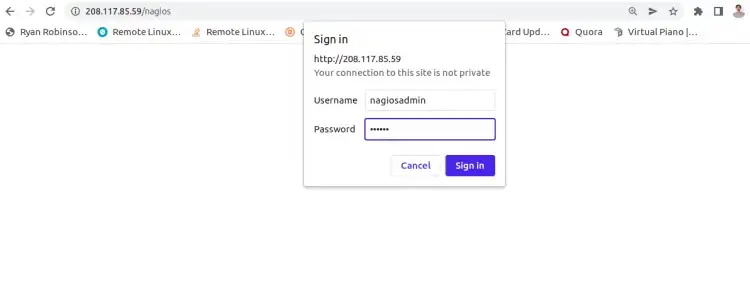
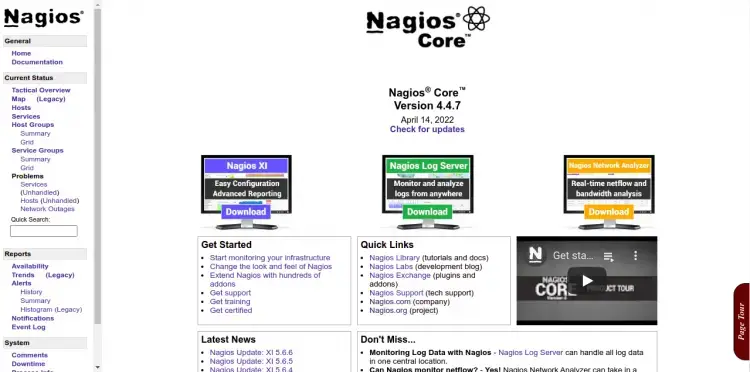
Cung cấp tên người dùng, mật khẩu quản trị Nagios của bạn và nhấp vào nút OK . Bạn sẽ thấy bảng điều khiển mặc định của Nagios trên màn hình sau:
Phần kết luận
Xin chúc mừng! Bạn đã cài đặt thành công phiên bản mới nhất của Nagios Core trên máy chủ Ubuntu 22.04. Bây giờ bạn có thể triển khai Nagios trong cơ sở hạ tầng của mình, thêm máy chủ giám sát và bắt đầu giám sát chúng thông qua trình duyệt web. Hãy thoải mái hỏi tôi nếu bạn có bất kỳ câu hỏi nào.
Đọc thêm:

Add Comment