









Minimal Firewall is a lightweight, privacy-first network control tool that works together with Windows Firewall to block all unknown connections by default and let you create clear, app-based rules for internet access.
What Is Minimal Firewall for Windows?
Minimal Firewall for Windows is a small, powerful tool that integrates directly with the built-in Windows Firewall to give you strict control over which programs can access the internet. Instead of allowing applications to connect in the background, it blocks all unidentified traffic by default and asks you to decide what is allowed or denied.
By building on the native Windows Firewall instead of replacing it, Minimal Firewall avoids risky system modifications and keeps your setup stable, secure, and easy to manage. This makes it a smart choice for users who care about privacy, security, and transparency in how their apps communicate online.
How Minimal Firewall Works
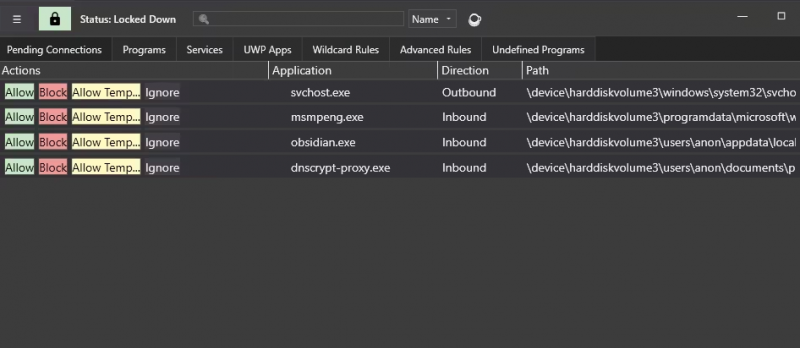
Minimal Firewall does not create a separate firewall engine but uses the existing Windows Firewall rules as its foundation. When an application without a predefined rule attempts to connect, the tool intercepts the request and prompts you to create a simple allow or block rule.
This behavior helps reduce malware activity, stop unknown software from sending data remotely, and prevent silent data leaks from applications that try to “phone home” without your knowledge. Over time, you build a set of clear, application-based rules that reflect exactly how you want your system to talk to the internet.
Core Feature: Lockdown Mode
Lockdown Mode is the central feature of Minimal Firewall for Windows and the main reason many users install it. When Lockdown Mode is enabled, every network connection that does not have an explicit Windows Firewall rule is blocked by default.
No program can connect to the internet unless you have clearly allowed it, which gives you complete control over outbound traffic. This strict default-deny approach significantly improves security and is especially useful on laptops, shared computers, or systems that handle sensitive information.
Real-Time Connection Alerts
Minimal Firewall provides real-time notifications whenever a blocked program tries to access the network. These alerts allow you to make quick decisions on the spot without digging through complex menus or logs.
You can choose between more visible pop-up prompts or quieter in-app notifications depending on how intrusive you want the alerts to be. This flexibility lets you maintain strong security while keeping interruptions to a comfortable level.
One-Click Rule Creation
One of the main usability advantages of Minimal Firewall for Windows is its one-click rule creation. When you see an alert or view a blocked connection, you can allow or block the application permanently with a single click.
If you only want to grant temporary access, you can also allow or block the app for a limited time instead of creating a permanent rule. This simple workflow makes it easy for non-technical users to manage network permissions without needing to understand every technical detail of Windows Firewall.
Wildcard Rules for Frequently Updated Apps
Many modern applications, such as web browsers and certain game launchers, update frequently and may use different executable versions or filenames over time. Minimal Firewall solves this with wildcard rules.
Wildcard rules let you define a policy that applies to any executable within a specific folder or path, so new versions of the app are automatically covered. This saves you from constantly recreating rules after updates while keeping your security policies consistent.
Support for Services and UWP Apps
Minimal Firewall is not limited to classic desktop applications. It also supports Windows services and modern UWP (Universal Windows Platform) apps from the Microsoft Store.
This means you can manage rules for background system services and store apps in the same interface, giving you a unified view of network access across your entire system. As a result, you can better understand and control what both visible programs and background components are doing online.
Clean Interface with Light and Dark Themes
User experience is a key part of security tools because a confusing interface often leads to misconfigurations. Minimal Firewall offers a clean, simple UI that is easy to read and navigate for both beginners and advanced users.
You can switch between light and dark themes, making the app comfortable to use in both bright and low-light environments. This attention to visual clarity helps you quickly review rules, alerts, and settings without feeling overwhelmed.
100% Local and Privacy-Focused
Privacy is central to the Minimal Firewall design. The application does not contain telemetry, does not connect back to its own servers, and does not send any of your usage data over the internet.
All firewall rules and logs created by the tool are stored locally on your own machine. This approach is ideal for users who want a firewall companion that truly respects privacy and does not introduce additional tracking or remote dependencies.
Portable Firewall for Windows Users
Minimal Firewall can be used as a portable application, which is very useful if you manage multiple devices or work in environments where you cannot install traditional software. You can copy the app to a USB drive or another folder and run it without a complex installation process.
In addition, the tool allows you to remove all rules it has created, so you can leave no trace of your configuration if needed. This makes it suitable for technicians, security-conscious users, and anyone who needs temporary but strict network control on different systems.
Benefits of Using Minimal Firewall for Windows
Using Minimal Firewall for Windows offers clear advantages for home users, professionals, and privacy enthusiasts. Some key benefits include:
- Stronger security thanks to default-deny behavior for unknown connections.
- Better privacy by blocking hidden “phone home” connections and data leaks.
- Easier rule management through one-click actions and wildcard support.
- Full control across desktop apps, services, and UWP applications.
- Local-only data storage with no telemetry or external connections.
- Portable usage and the ability to remove all created rules at any time.
By combining these benefits, Minimal Firewall becomes an excellent companion to the native Windows Firewall and a practical solution for users who want more visibility and control over their network traffic.


Add Comment